![Vladimir [RaleyApps]](https://storage.ghost.io/c/54/bc/54bce786-a3c0-4ea3-b0f4-96f64229d4ff/content/images/size/w150/2026/02/Vlad-9-1-1.jpg)
Traditional purchasing workflows often create a disconnect between employee requests and back-end order fulfillment. Raley Procurement bridges this gap by generating and editing purchase orders directly inside JSM tickets, complete with necessary financial controls and approvals.
The purchase order flow now runs entirely inside the JSM ticket.
Open a JSM Ticket anc you will see autogenerated purchase order right there within the ticket, ready for you to work on.
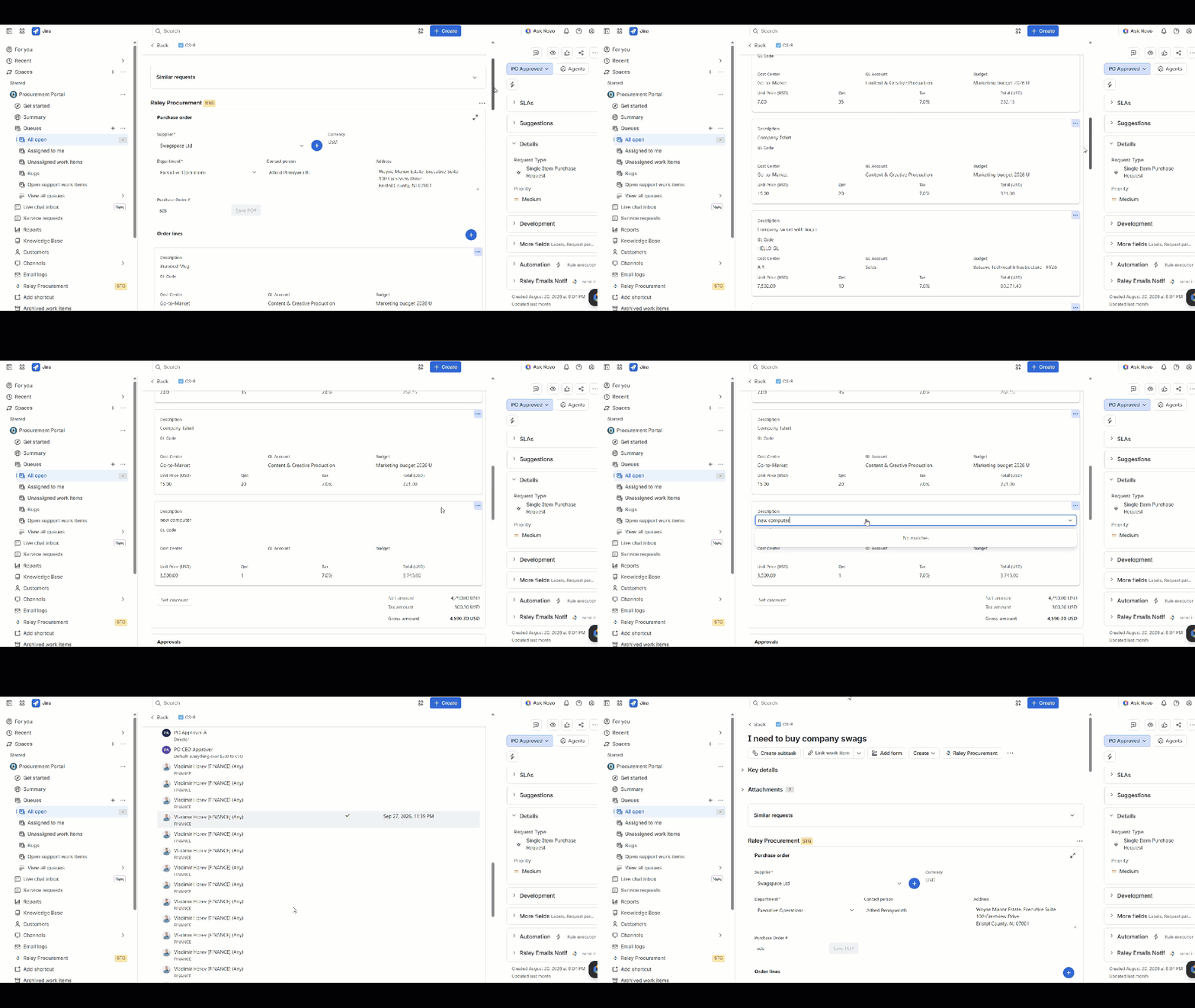
You can edit the order in the ticket, line by line, or in an expanded table view. Pick the view that fits the moment. Both write to the same purchase order.
Inline in the ticket, each order line is a card. Pressing the plus button adds a new line with its own Save and Discard buttons, so a requestor can add an item without leaving the request. or
The expand icon opens the Purchase request modal, where the order lines appear as a spreadsheet-style table. Click a cell to change it. Enter or Tab applies the change; Escape cancels it. This is the view for a procurement person tidying up a ten-line order, or for finance correcting a GL account across several lines.
Finance fields on every line, totals that keep up
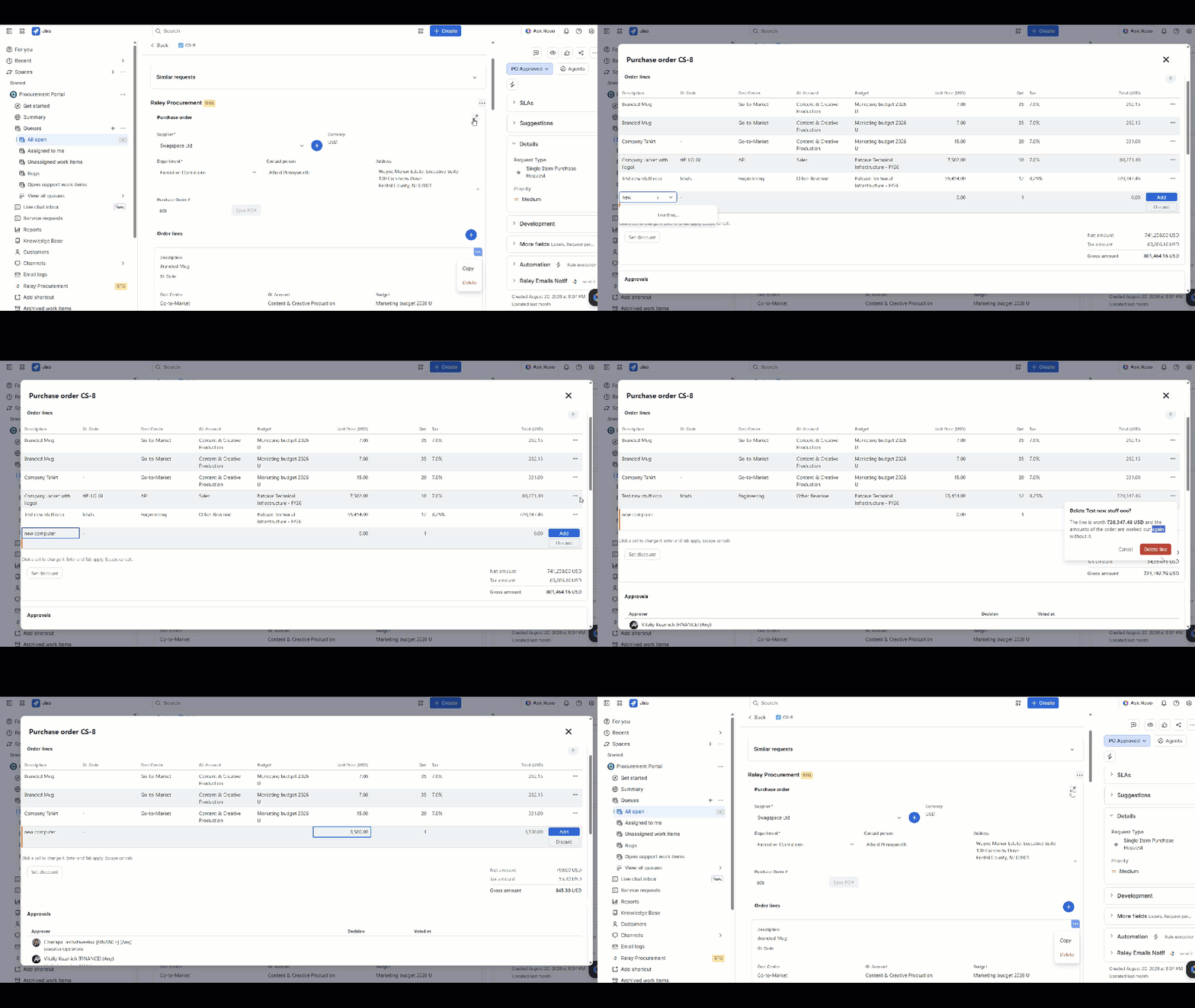
Each order line carries the fields finance needs to route the approval and record the spend.
Below the lines, the Net amount, Tax amount, and Gross amount update as lines change. A Set discount button applies a discount to the order. Because the cost centers, GL accounts, budgets, and tax rates come from the Finance settings, a requestor picks from your lists rather than typing codes from memory.
Approvals under the order, in both views
The Approvals section lists each approver with a role tag such as FINANCE, their department, their decision, and the time they voted. Approve Purchase Order and Reject Purchase Order sit under the order in the inline view and in the expanded view, so an approver reads the lines and decides on the same screen.
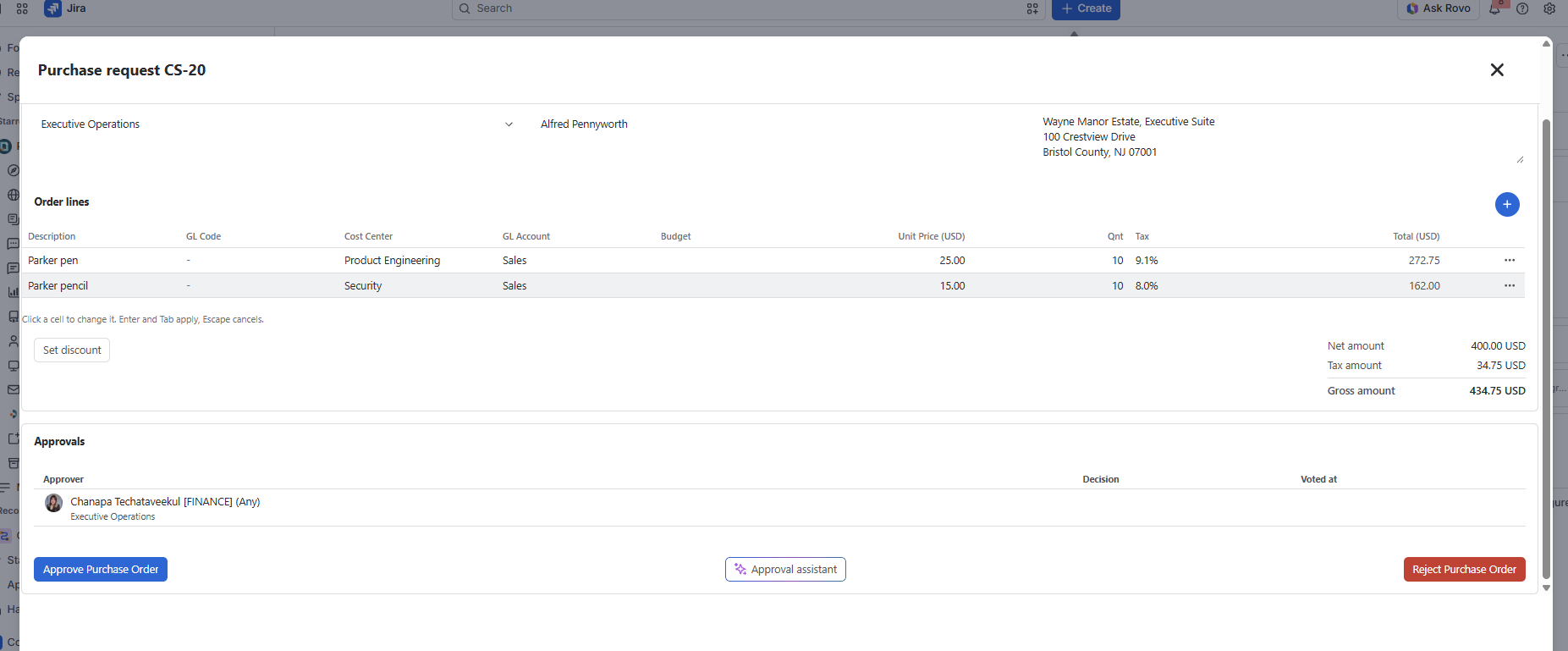
Between the two buttons sits Approval Assistant. It opens the AI Assistant, which reviews the order with the approver. It cannot approve or reject anything itself.
The Approval AI Assistant will help guide the approvers in deciding, then explains why an order was decided. Compares the order with the supplier’s earlier orders, prices, discounts, budgets, and the ticket discussion
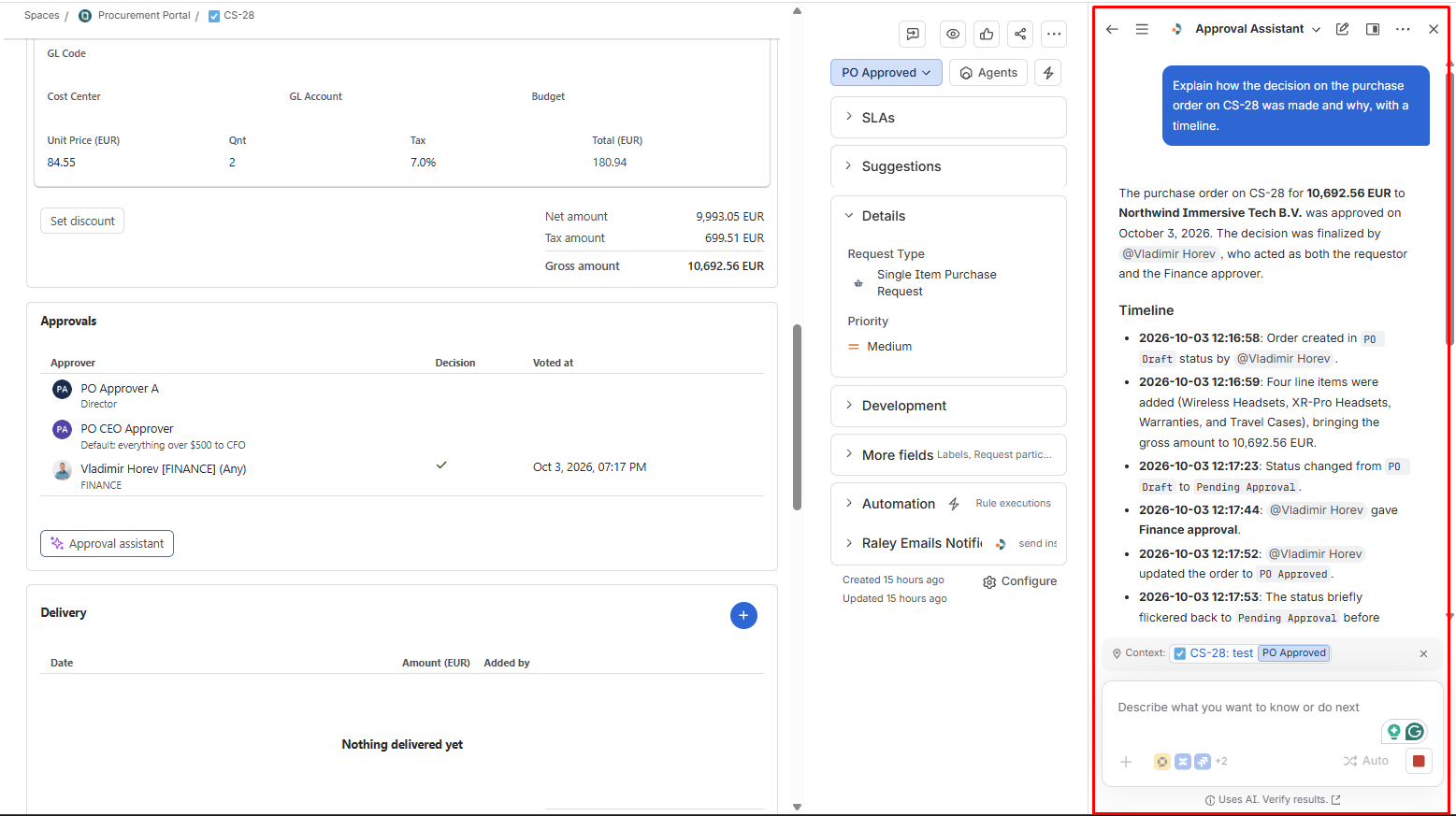
Find out more indetails about Raley Procurement AI Agents via The AI Procurement Assistant for Jira article
Every change to the order is logged on the ticket
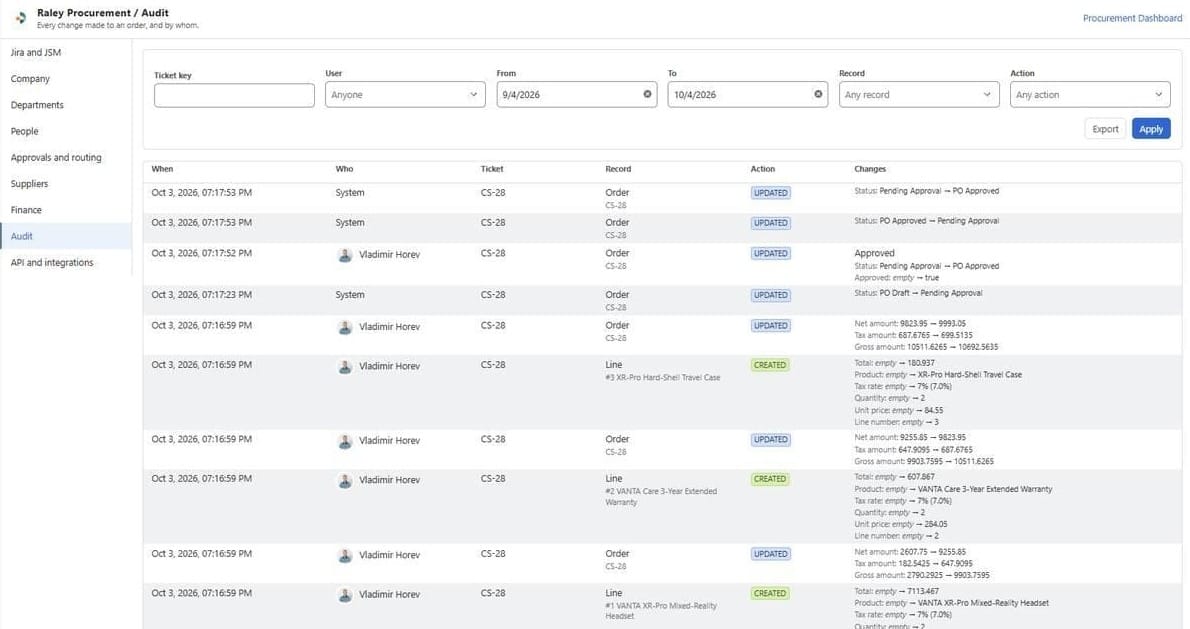
A purchase order that lives on the ticket also keeps its history there. A Procurement Audit tab sits in the ticket's Activity panel, next to Comments and History, and records every change to the order and to each line: when it happened, who made it, which record changed (the Order or a Line), the action (CREATED or UPDATED), and the value before and after.
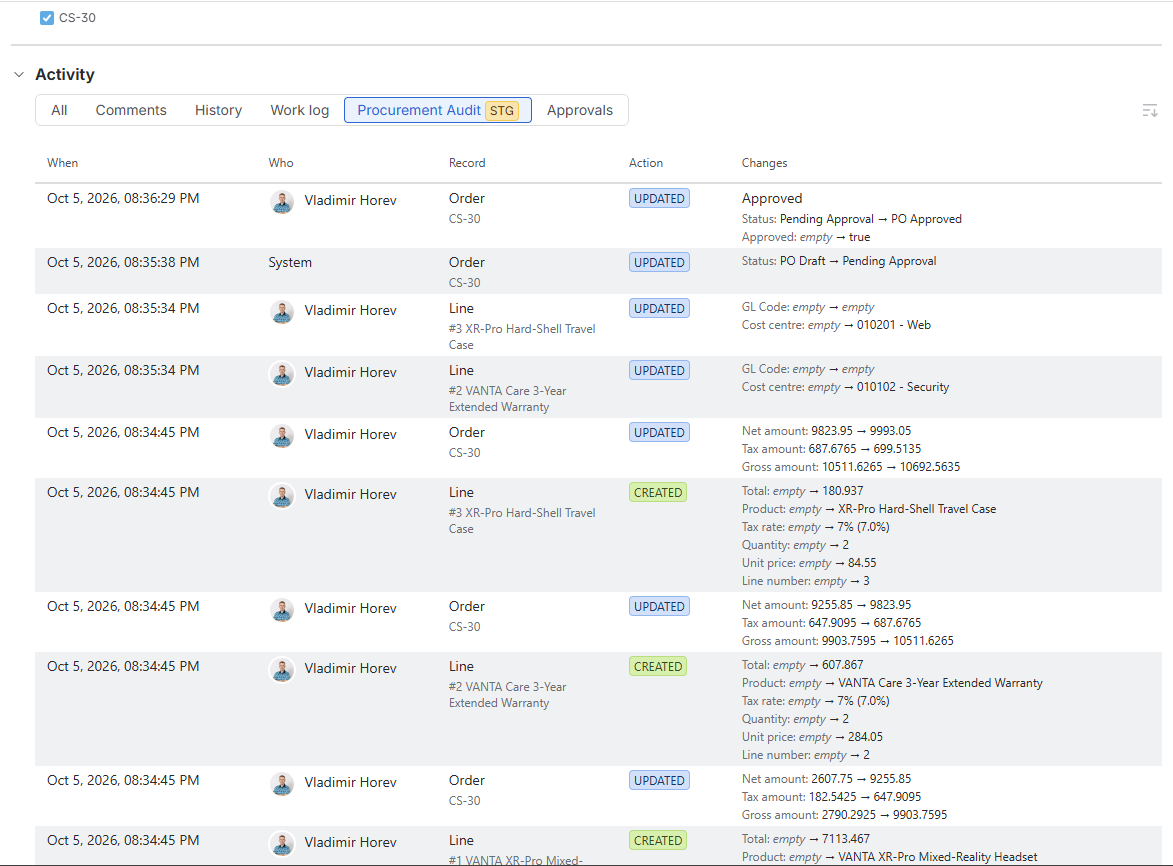
Read the log from the bottom up, and the order's life is there in full. Three lines are created within the same second, and the order's net, tax, and gross amounts are recalculated and logged after each one. A minute later, two lines get a cost center assigned, with the empty value and the new value side by side. The System moves the status from PO Draft to Pending Approval. The approver moves it from Pending Approval to PO Approved, and the Approved flag flips to true, with their name and the time on the row.
Nobody wrote any of that down. It is a byproduct of working on the order in the ticket, which is what makes it useful when finance asks in three months why an amount changed. The same log is also available company-wide under Settings, filterable and exportable; [the dashboard and audit article] covers that view and the Reports that sit beside it.
Settings areas, written in Finance Terms
Admin settings are rebuilt as one left-hand menu. Every page has a plain-language subtitle stating what it controls, and a Procurement Dashboard link sits top-right on every page.
| Finance term | Where it lives in Settings | What you configure, and where it shows up |
|---|---|---|
| Cost centers | Finance | Your own list of cost centers. Offered as a dropdown on every order line; an approval route can key off it. |
| GL accounts | Finance | Your own chart of GL accounts. Offered as a dropdown on every order line; an approval route can key off it. |
| Budgets | Budgets tab, picked on the line | Named budgets with a period and a total. Offered as a dropdown on every order line; requested, approved, paid, and remaining tracked per budget. |
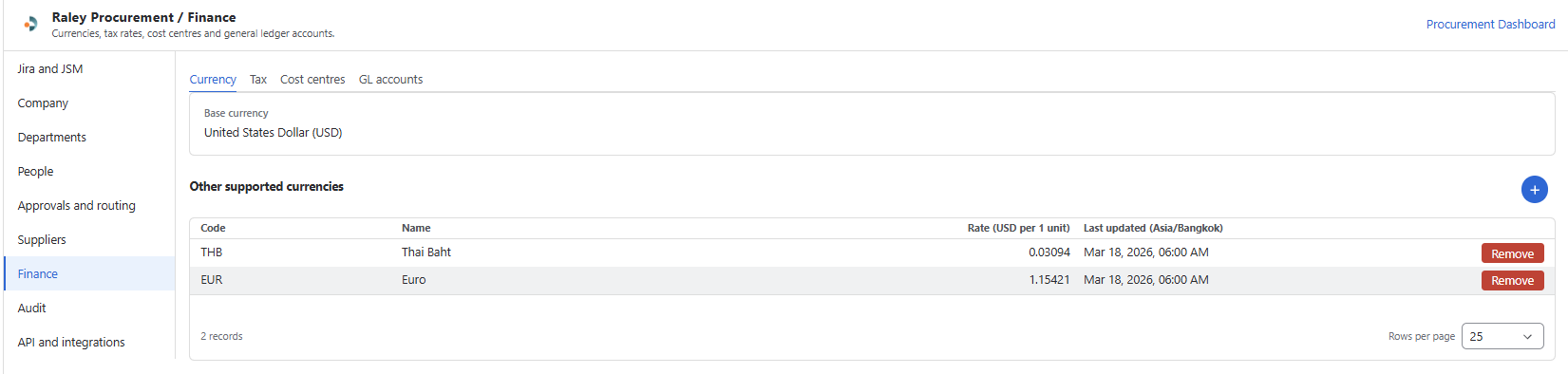
| Currencies | Finance | A base currency plus other supported currencies with exchange rates. Each purchase order carries its currency; unit prices are entered in it. |
| Tax rates | Finance | The tax rates your orders use. Applied per line, with net, tax, and gross recalculated as lines change. |
| Departments | Departments | The parts of the business that raise orders, their employees, and their department approvers. |
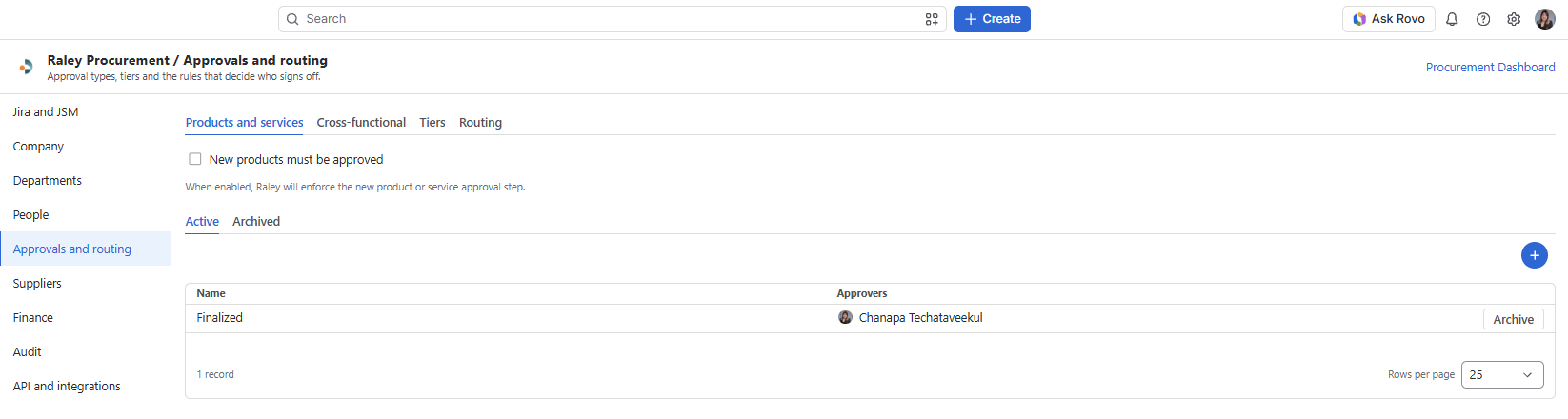
| Approval tiers and limits | People; Approvals and routing | Who takes part and their role (Company admin, Finance, Approver, Team member), each person's approval tier and approval limit, approval types (Products and services, Cross-functional), tiers and routing rules, and an optional step that new products must be approved. |
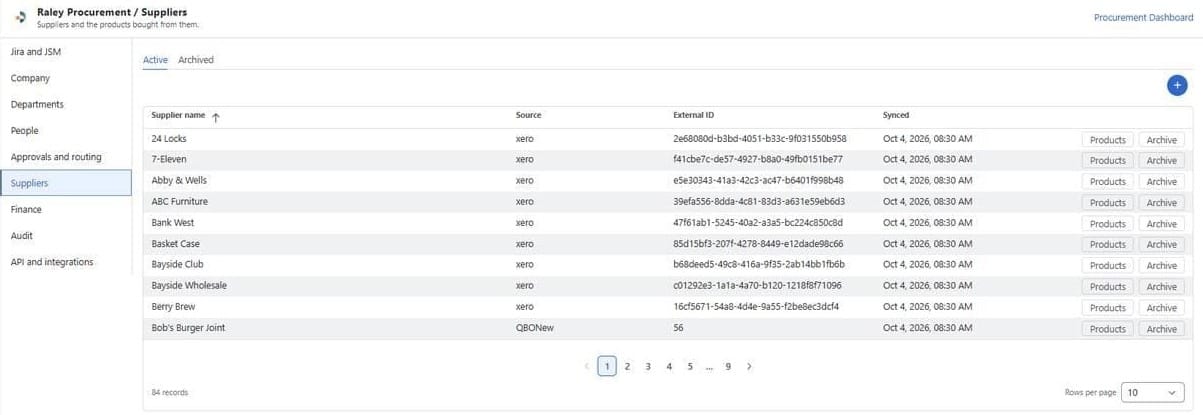
| Suppliers | Suppliers | The supplier master list with source system, external ID, and last sync time, plus each supplier's products. Requestors may be allowed to add a supplier from the purchase order form. |
| Company and project | Company; Jira and JSM | Company name, address, logo, default discount name, request sharing inside the organization; which project, work type, and JSM request types procurement runs on; who may edit a purchase order (Team Member and Finance, or Finance only); the PO number custom field. |
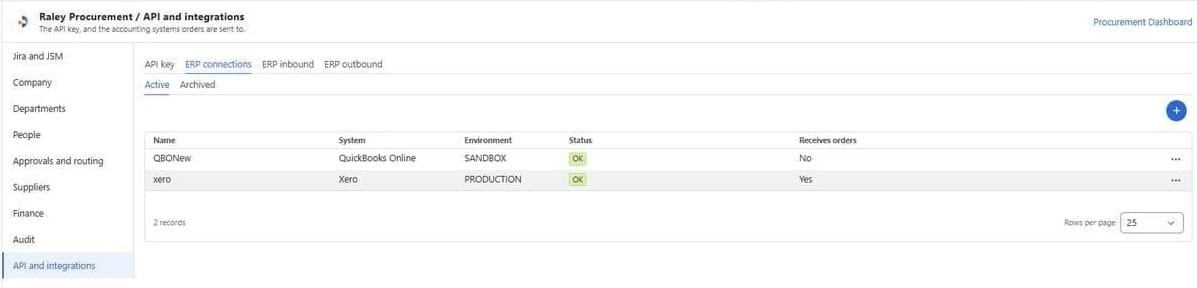
| Audit, API and integrations | Audit, API and integrations | The audit log of every change to an order and by whom, with filters and Export; the API key; ERP connections with status; ERP inbound and outbound settings. |
Here are some more examples of what it looks like inside Raley Procurement App Settings.
Raley Procurement for JSM is built for indirect spend:
The laptops, licenses, contractors, services, and supplies that every department buys and that no single buyer owns. It fits companies that already run Jira Service Management and want purchase requests, orders, and approvals to live there, with finance structure (budgets, cost centers, GL accounts, currencies) applied on every line. For the wider picture on why indirect spend leaks and what control looks like, read that article first.
It is not built for direct materials, bills of materials, sourcing events, or supplier contract management. If your spend is the product you sell, you need a different category of tool.
Try it on your own ticket
The fastest way to judge this is to raise one real request, generate the purchase order on the ticket, and have one approver decide under the order lines. If the three people involved can each see what they need without opening another tool, it fits.
Start a free trial of Raley Procurement on the Atlassian Marketplace and run that one request this week. Prefer a walkthrough first? Book one on the product page.
Can you create a purchase order in Jira Service Management?
Yes. With Raley Procurement installed, a purchase request raised from the JSM portal carries a purchase order on the ticket itself, with supplier, order lines, totals, and approvals. The order is edited in the ticket, inline or in an expanded table, and approved there.
Do requestors need a Jira license to raise a purchase request?
Requestors raise requests from the JSM customer portal as JSM customers. Approvers and admins work in Jira. Check the Marketplace listing for the current pricing model, which follows the user count of the parent Atlassian product.
Which finance fields are on a purchase order line?
GL code, cost center, GL account, budget, unit price, quantity, and a per-line tax rate, with a calculated line total. Cost centers, GL accounts, budgets, and tax rates are dropdowns populated from the Finance settings.
Who can edit a purchase order?
An admin chooses in the Jira and JSM settings page: Team Member and Finance, or Finance only.
Does Raley Procurement support more than one currency?
Yes. The Finance settings hold a base currency and other supported currencies with exchange rates. Unit prices are entered in the purchase order’s currency.
Is this the right tool for indirect spend only?
It is built for indirect spend inside Jira and JSM: purchase requests, approval routing, purchase orders, budgets, and a clean handoff to the ERP. It does not cover sourcing events, contracts, or direct materials planning.
![Vladimir [RaleyApps]](https://storage.ghost.io/c/54/bc/54bce786-a3c0-4ea3-b0f4-96f64229d4ff/content/images/size/w300/2026/02/Vlad-9-1-1.jpg)


